


It's been a year and a half since PureDark released his Elden Ring NVIDIA DLSS 3 Frame Generation mod. The paid mod allowed GeForce RTX 40 Series owners a significant performance boost in the notoriously badly optimized game developed by FromSoftware.
However, everyone else without an RTX 40 Series GPU has been out of luck so far. That changes with the recently released free AMD FSR Frame Generation and Temporal Super Resolution (ERSS-FG) mod by Nexus Mods user huutaiii.
This mod supports AMD FSR 3 Super Resolution and Frame Generation, NVIDIA DLSS Super Resolution and DLAA, and even Intel XeSS. The modder shared a few caveats: this is mutually exclusive with their previous ERSS2 mod (which did not support Frame Generation); the Frame Generation feature is not compatible with ReShade; and, most importantly, you can't play online on official servers with this mod enabled.
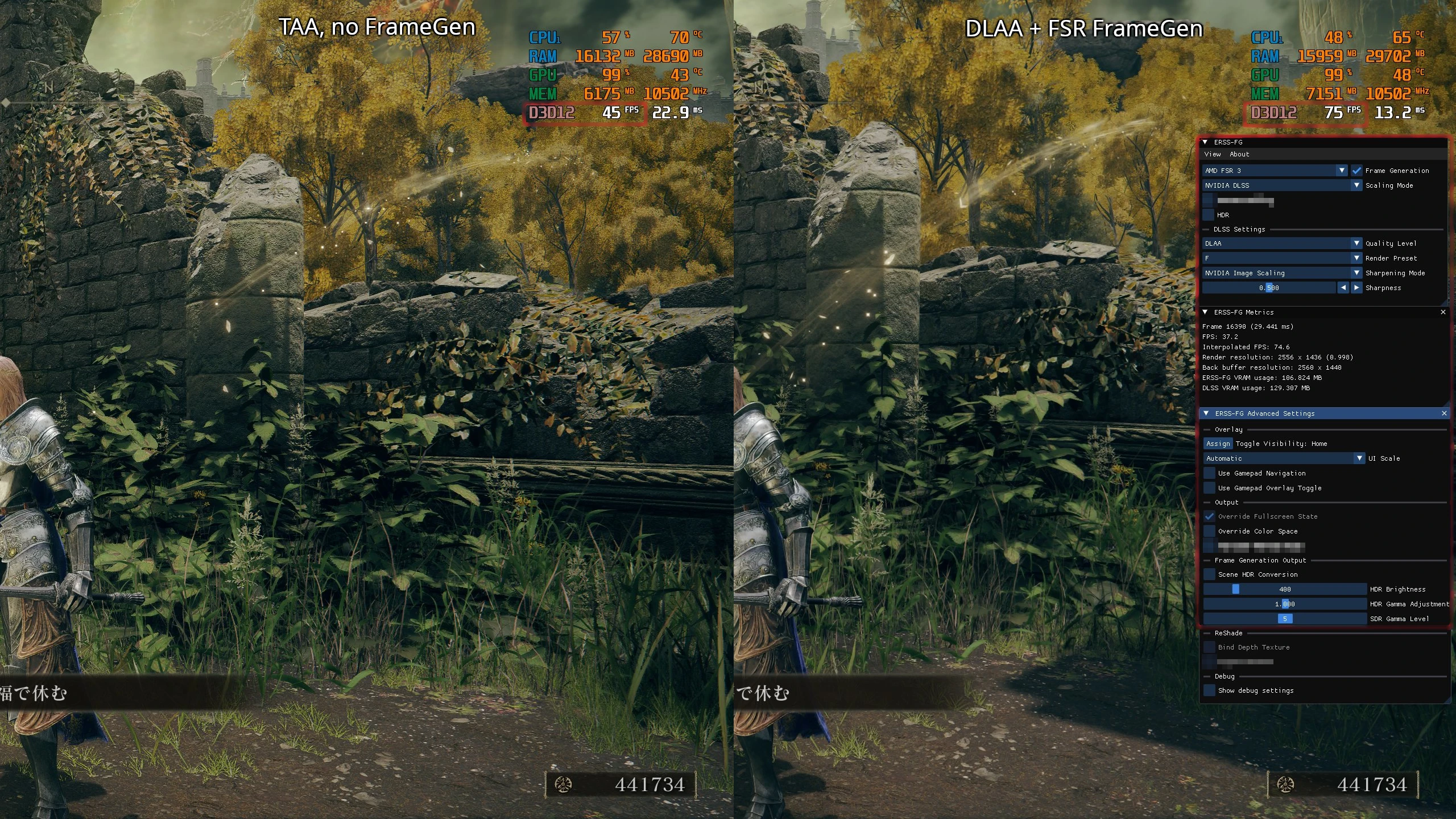
Here's the recommended installation method for this Elden Ring AMD FSR 3 mod:

- Extract the attached file's content into the ELDEN RING\Game\ directory (including ERSS-FG.dll, dxgi.dll and the folder ERSS2; the file ERSSReShadeStub.addon can be removed).
- Disable Easy Anti-Cheat, either by putting cmd /c start eldenring.exe & rem %command% in launch options in Steam or by using some other tool.
- For Steam Deck (Linux) users: cmd=(%command%); cmd[-1]="eldenring.exe"; WINEDLLOVERRIDES="dinput8=n,b;dxgi=n,b" "${cmd[@]}"
- Set Resolution in the game's Graphics menu to .r target resolution (i.e. your monitor's resolution)
- Open the mod's configuration overlay with the Home key, set Frame Generation method to AMD FSR then restart, and set Super Sampling setting to the upscaling technology of your choice
There are several known issues with the current release of this Elden Ring AMD FSR 3 mod, though:
- Flickering global illumination, most visible in shaded areas
Workarounds:- Restarting the game may make it go away temporarily
- Using the GI Glitch Mitigation options in Advanced Settings -> Frame Generation (which may reduce frame rate slightly depending on which option you select)
- Rolling back NVIDIA GPU drivers to version 552.12
- Using DXVK + VKD3D (doesn't support DLSS on Windows)
- Setting Global Illumination to Low can reduce the intensity
- Some reported that turning on Ray tracing can make the issue go away.
- Game UI color is slightly off & requires manual configuration in HDR
- There may be some glitches on non-16:9 resolutions outside of the main 16:9 screen area
- Conflicts with other overlay mods (using standalone installation method)
- Cannot be loaded by adding to Special K plug-ins. It can run alongside SK with the included DXGI.dll loader albeit with some issues
- FSR FG + Special K: if Elden Ring's screen mode is set to Full-screen, the game will constantly try to reset it's output swap chain causing flashes
- The Special K overlay is invisible
Even with these caveats and issues, this might still be useful for those who have been waiting for the right time to dive back into Elden Ring and play the Shadow of the Erdtree expansion.

About the author: With over two decades of experience in gaming journalism, Alessio Palumbo has led the gaming vertical at Wccftech since August 2015. He started working at a young age for Italian websites like Everyeye.it, Gamestar.it, Nextgame.it, and Multiplayer.it before kickstarting the indie English-language publication Worlds Factory as its founder and Editor in Chief. In the last decade, he has coordinated the overall output of Wccftech's gaming section, managed PR relations, assigned reviews, produced daily news coverage, edited gaming content as needed, and delivered game reviews. Arguably, his trademark content is the long series of exclusive developer interviews that have been cited by Wikipedia and by the biggest news media and gaming publications. His passion for technology also makes him knowledgeable when it comes to gaming hardware and tech. His favorite genres include RPGs, MMORPGs, and action/adventure games.
Follow Wccftech on Google to get more of our news coverage in your feeds.


