


Microsoft recently implemented a "security" measure to ensure users log into a Microsoft account to install Windows 11, but another bypass has emerged online.
Microsoft's Windows 11 OOBE Experience Might Just Get Much Smoother, With a New Bypass That Skips Microsoft Account Process
Microsoft always finds a way to bug users with Windows 11 and its security measures. In a previous report, we discussed how the firm had patched the popular bypass script "bypassnro.cmd" that allowed users to complete OS installation without setting up a Microsoft account. While the announcement certainly wasn't a joyful one, it seems like a workaround has already been figured out by the X user @witherornot1337. It simply involves executing a command on the CMD, and here's how you can do it, too.
Improved bypass for Windows 11 OOBE:
1. Shift-F10
2. start ms-cxh:localonlyOnly required on Home and Pro editions. pic.twitter.com/ZUa89ZPBI3
— Wither OrNot (@witherornot1337) March 29, 2025
In order for this bypass to work out, you must install the Home and Pro editions of Windows 11, since for other models, you can use the “I don’t have internet” button. The bypass involves pressing "Shift + F10" when you are in the initial step of setting up Microsoft Windows 11 after installation, and that will prompt CMD to open up. Enter the "start ms-cxh:localonly" command, and you'll see another window pop-up, leading you to create a local user account only. This apparently removes the restriction of setting up a Microsoft account and is a much simpler implementation.

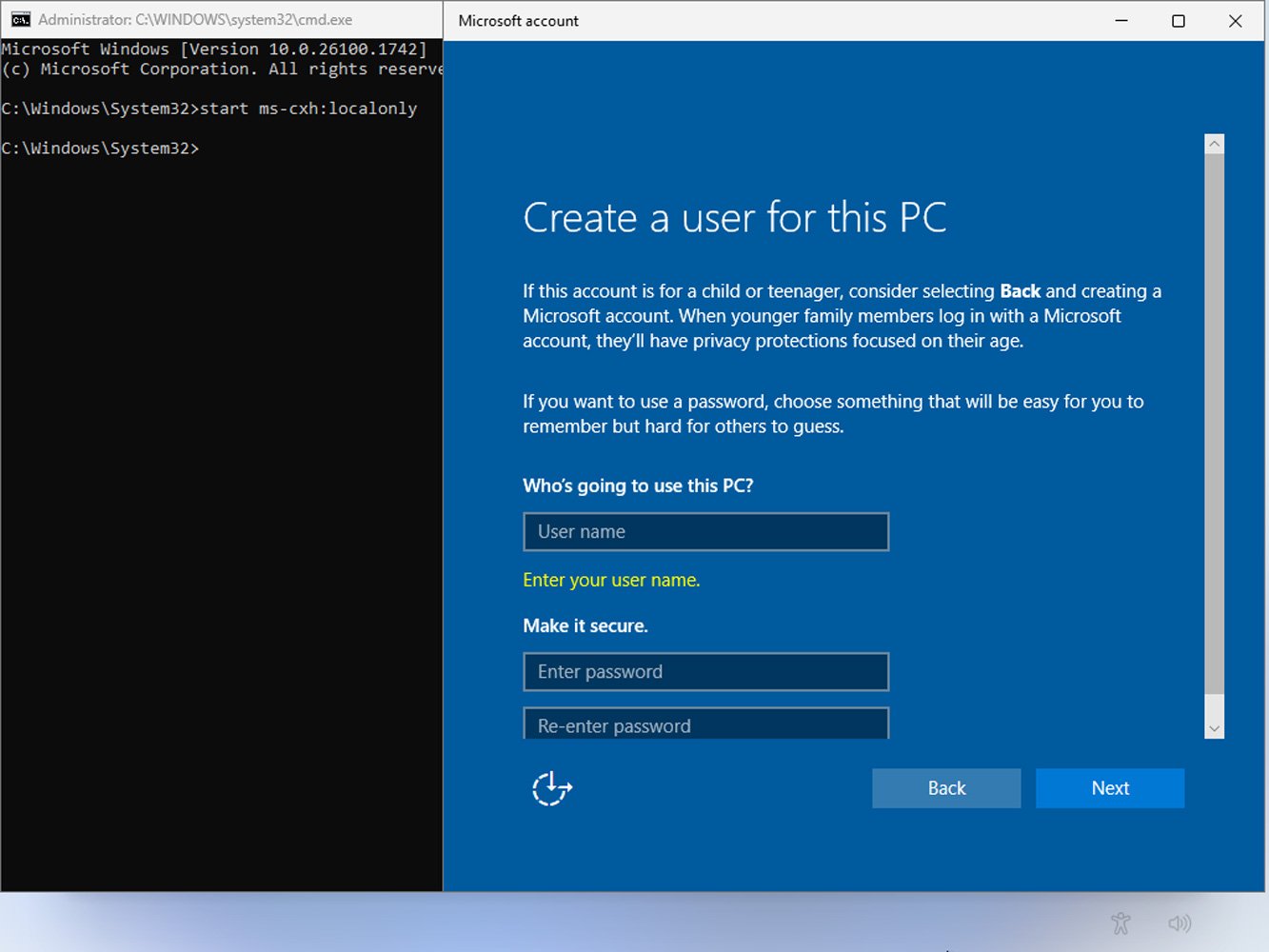
So, with what I have interpreted, the ms-cxh command is responsible for most of the Windows 11 OOBE (Out-of-Box Experience) process, and with the "local only" tag alongside it, it forces the Microsoft Cloud Experience Host (CXH) to skip the internet and Microsoft account requirements. Apparently, the process is defined by a JSON file located within CXH directories, and by this, you can now skip setting up a Microsoft account, which is troublesome, especially if you are looking forward to accessing your OS quickly on the first run.
Maybe Microsoft will patch this method out as well with the next Windows 11 insider update since it claims not setting up a Microsoft account is a "security issue," but for now, this bypass works just fine.


About the author: Muhammad Zuhair is a hardware and technology reporter for Wccftech, specializing in the semiconductor industry and the complex interplay between technology, manufacturing, and geopolitics. His coverage focuses on the corporate strategies and technological roadmaps of industry giants like TSMC, NVIDIA, Samsung, and Intel. Zuhair's expertise lies in deconstructing complex topics such as fabrication nodes (e.g., 2nm process), the economic impact of policies like the CHIPS Act, and the strategic development of AI infrastructure from NVIDIA, AMD and Intel.
Follow Wccftech on Google to get more of our news coverage in your feeds.


