


Microsoft's latest Windows 11 update will introduce a new way for Task Manager to calculate CPU utilization, which will be similar to third-party tools.
Windows 11 Update Will Make CPU Monitoring Much More Effective With Task Manager, Potentially Avoiding The Need For Third-Party Apps
It seems like Microsoft has acknowledged that the performance metrics displayed to users through Task Manager are quite incapable compared to what third-party tools offer. In light of this, they will pushed out a new update that will adopt a different method of calculating CPU utilization figures, in line with what other tools offer. This means that Task Manager will now be a lot more effective.
We are beginning to roll out a change to the way Task Manager calculates CPU utilization for the Processes, Performance, and Users pages. Task Manager will now use the standard metrics to display CPU workload consistently across all pages and align with industry standards and third-party tools.
- Microsoft
While we are uncertain about how the new update will change the calculation of CPU utilization, we do know that the calculations will be unified across all pages, i.e., Processes, Performance, and Users pages, which means that the figures being shown on third-party platforms will be similar to what Task Manager will show, avoiding any inconsistency and ensuring native support for CPU monitoring. Instead of opting for third-party options like HWINFO, Task Manager will now do the job, but we will have to wait and see when the update drops.

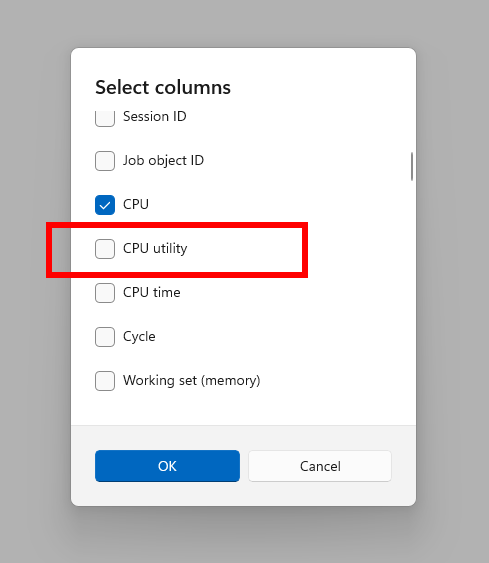
Moreover, for users who would prefer the current calculation method, Microsoft has created a new optional column called CPU Utility on the "Details" tab, making backward compatibility an easier option. For now, the above-mentioned updates are a part of Windows 11 Insider Preview Build 26120.3360, a part of the 24H2 update, which means that the changes will gradually roll out for users over time, however, it is certainly great to see Microsoft working on ensuring an optimal experience for consumers,


About the author: Muhammad Zuhair is a hardware and technology reporter for Wccftech, specializing in the semiconductor industry and the complex interplay between technology, manufacturing, and geopolitics. His coverage focuses on the corporate strategies and technological roadmaps of industry giants like TSMC, NVIDIA, Samsung, and Intel. Zuhair's expertise lies in deconstructing complex topics such as fabrication nodes (e.g., 2nm process), the economic impact of policies like the CHIPS Act, and the strategic development of AI infrastructure from NVIDIA, AMD and Intel.
Follow Wccftech on Google to get more of our news coverage in your feeds.


